
Describe the work
Explain the job in an AI-assisted conversation, then review the proposed scope, deliverables, milestones, schedule and billing method before publishing.
An AI-assisted intake shapes the project, qualified specialists are matched to it, and the secure cloud workspace gives the selected specialist a licensed, controlled place to deliver the work.
Your team sees the project, candidates, milestones, comments and acceptance path in one workflow — with Giga Techspace as the contractual partner.
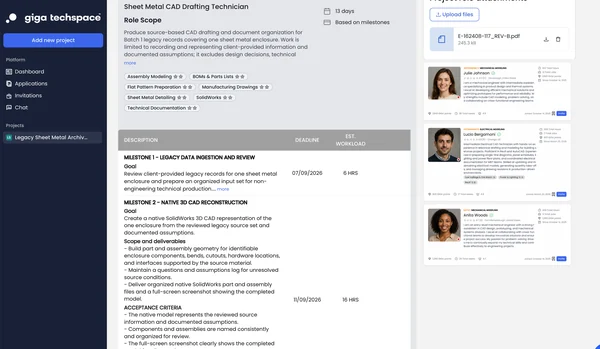
Explain the job in an AI-assisted conversation, then review the proposed scope, deliverables, milestones, schedule and billing method before publishing.
Specialists whose confirmed skills match the work package are surfaced through the platform, and the recommendation is reviewed before anyone is put in front of you. Your team can also invite matching profiles.
Review the profile, confirmed skills, proposed availability and project terms. Your team selects who works on the project.
The selected specialist works in a project-specific cloud workspace with the approved CAD applications and project files.
You are notified when a milestone is submitted. Download the files, open them in your own environment, then approve or decline with comments. Approval releases the next milestone.
Accept completed milestones and receive the project outputs through the controlled delivery path. Your contract is with Giga Techspace, not with the specialist.
The pattern is selected during scoping based on technical feasibility, security requirements and the customer’s engineering environment.
Source files are uploaded through the project workflow, used inside the project-specific secure cloud workspace and returned through the same controlled delivery path.
Where feasible, the specialist accesses the customer’s approved PDM, PLM or cloud engineering environment from the secure cloud workspace using an assigned project identity.
Specific PDM or PLM integration is qualified per project; no universal integration is assumed.
The platform keeps project definition, specialist selection, secure execution and milestone acceptance in one place around the standards your team already uses.
You remain in control of specialist selection and every acceptance checkpoint. Giga Techspace supplies the contractual and operational environment that makes external CAD production easier to run.
A redline batch, five conversion samples or a small fabrication drawing set makes standards and acceptance criteria visible before you scale capacity.
Share the task type, source material and expected output. We’ll turn it into a clear, managed production package.