
Define the target
A guided intake shapes the source set, target format, file structure, drawing standard and milestones.
PDF to CAD conversion services, paper to CAD conversion, 2D to 3D CAD conversion and legacy migration — from a handful of files to a full archive, run in milestones you control.
Shape the milestones the way the work needs. A common first shape: make milestone one a small representative batch, approve it, then scale the rest once the standard is settled.
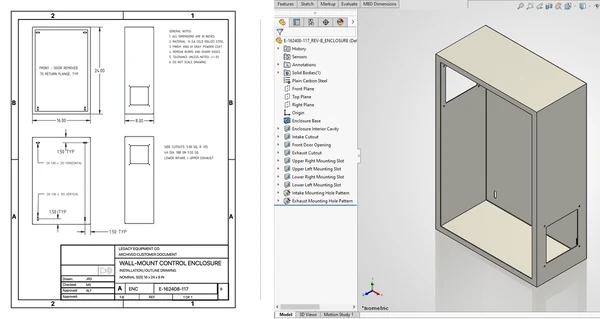
Every conversion package runs against agreed source material, templates and drawing standards. Illegible areas, missing dimensions and ambiguous geometry are logged for your reviewer rather than guessed — the sample batch is where those rules get fixed.
Old files and accumulated redlines block quoting, reuse and PDM adoption, but repetitive conversion is rarely the best use of senior engineering time. Making the first milestone a small representative batch makes the work measurable before volume execution.
Redline markups are waiting to be rebuilt in native CAD
Acquired product lines exist only on paper or PDF
SolidWorks migration is stalled by a large DWG archive
PDM or ERP rollout is blocked by inconsistent drawing data
A guided intake shapes the source set, target format, file structure, drawing standard and milestones.
A selected specialist creates a representative batch inside the secure cloud workspace.
Use the sample to lock naming, templates, model structure and acceptance criteria.
Conversion proceeds in visible milestones inside the project workspace.
Review the converted set, request in-scope edits and accept the completed delivery.
Conversion often arrives attached to something else — a drawing queue behind it, or captured data in front of it. Packages can stay separate or combine into one project.
Yes. Vector and scanned PDF drawings are recreated as editable DWG or native CAD files against a client-supplied template. Legibility limits and missing information are flagged in the sample batch before volume work starts.
Scanned prints and paper drawing archives are redrawn as clean CAD drawings using your title block, layer scheme and drawing standard. Pricing for paper to CAD conversion depends on legibility, sheet size and drawing density, which the sample batch establishes.
Yes. The intake defines the target model structure, feature approach, outputs and review points. Open questions about design intent are documented for your reviewer rather than assumed.
Yes — both directions are covered: 2D CAD conversion services for drawing archives and cleanup, and 3D CAD conversion services for model reconstruction and native-format migration. CAD conversion services in the USA are the current focus, with project files held in U.S.-based storage and specialists onboarded in the U.S. and Canada.
Yes, including native parts, assemblies and drawings where the target structure and standards are agreed during scoping.
Yes. Marked-up PDFs, scans and legacy drawings can become controlled updates in native CAD. The first sample confirms how revisions, notes, layers and client standards should be carried through the batch.
Ambiguities, missing dimensions and tolerance questions are documented rather than guessed. The specialist submits the milestone, you are notified that it is waiting, and you open the files in your own environment before approving or declining with comments.
A handful of representative drawings is enough. Making the first milestone a small batch is the cheapest way to prove scope, standards and the review workflow before archive-scale volume.
Send a handful of representative drawings and the target format. We’ll turn them into a conversion standard you can approve before volume work begins.